Tip
故事的起因是我出于好奇,加入了开往的 QQ 群,和群友聊天很有启发,折腾了一些新东西
RSS
老实说,我知道它可以订阅博客以及其他的网站,但真没有深入了解过
美化博客RSS
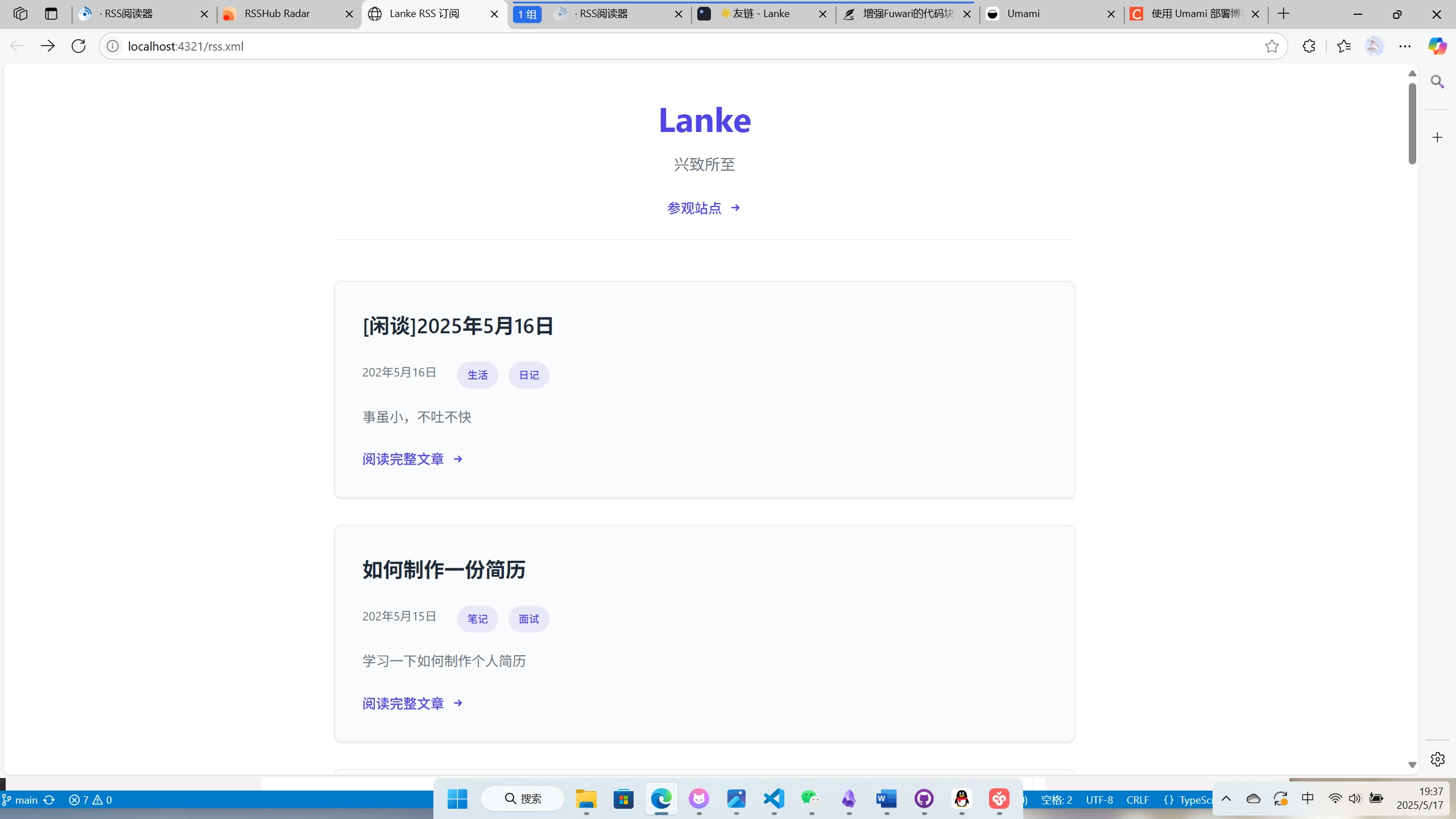
原本的 RSS 地址是 xml 格式,看上去跟一团乱码一样,但是可以用 xsl 进行美化。具体的不多叙述,会附上他人的博客教程,这里只记录我具体的实操。
新建 rss.xsl
在 public 目录下新建一个 rss.xsl 的文件,保存具体的样式,作用类似于 CSS。
xml
<?xml version="1.0" encoding="UTF-8"?>
<xsl:stylesheet
  version="1.0"
  xmlns:xsl="http://www.w3.org/1999/XSL/Transform"
  xmlns:atom="http://www.w3.org/2005/Atom"
  exclude-result-prefixes="atom"
>
  <xsl:output method="html" doctype-system="about:legacy-compat" />

  <!-- 月份映射模板 -->
  <xsl:template name="month-to-number">
    <xsl:param name="month-abbr" />
    <xsl:choose>
      <xsl:when test="$month-abbr = 'Jan'">1</xsl:when>
      <xsl:when test="$month-abbr = 'Feb'">2</xsl:when>
      <xsl:when test="$month-abbr = 'Mar'">3</xsl:when>
      <xsl:when test="$month-abbr = 'Apr'">4</xsl:when>
      <xsl:when test="$month-abbr = 'May'">5</xsl:when>
      <xsl:when test="$month-abbr = 'Jun'">6</xsl:when>
      <xsl:when test="$month-abbr = 'Jul'">7</xsl:when>
      <xsl:when test="$month-abbr = 'Aug'">8</xsl:when>
      <xsl:when test="$month-abbr = 'Sep'">9</xsl:when>
      <xsl:when test="$month-abbr = 'Oct'">10</xsl:when>
      <xsl:when test="$month-abbr = 'Nov'">11</xsl:when>
      <xsl:when test="$month-abbr = 'Dec'">12</xsl:when>
      <xsl:otherwise>0</xsl:otherwise>
    </xsl:choose>
  </xsl:template>

  <xsl:template match="/">
    <html lang="{rss/channel/language}">
      <head>
        <meta charset="UTF-8" />
        <meta name="viewport" content="width=device-width, initial-scale=1.0" />
        <title><xsl:value-of select="rss/channel/title" /> RSS 订阅</title>
        <style>
          :root {
            --primary: #4f46e5;
            --primary-hover: #4338ca;
            --text: #1f2937;
            --light-text: #6b7280;
            --bg: #ffffff;
            --card-bg: #f9fafb;
            --border: #e5e7eb;
            --radius: 0.5rem;
            --shadow: 0 1px 3px rgba(0,0,0,0.1);
            --transition: all 0.2s ease;
          }

          @media (prefers-color-scheme: dark) {
            :root {
              --primary: #818cf8;
              --primary-hover: #6366f1;
              --text: #f3f4f6;
              --light-text: #9ca3af;
              --bg: #111827;
              --card-bg: #1f2937;
              --border: #374151;
              --shadow: 0 1px 3px rgba(0,0,0,0.3);
            }
          }

          * {
            box-sizing: border-box;
            margin: 0;
            padding: 0;
          }

          body {
            font-family: -apple-system, BlinkMacSystemFont, "Segoe UI", Roboto,
                         Helvetica, Arial, sans-serif, "Apple Color Emoji";
            line-height: 1.6;
            color: var(--text);
            background-color: var(--bg);
            padding: 2rem 1rem;
            max-width: 900px;
            margin: 0 auto;
          }

          header {
            text-align: center;
            margin-bottom: 3rem;
            padding-bottom: 1.5rem;
            border-bottom: 1px solid var(--border);
          }

          h1 {
            color: var(--primary);
            margin-bottom: 0.5rem;
            font-size: 2.5rem;
            font-weight: 700;
          }

          .subtitle {
            color: var(--light-text);
            font-size: 1.125rem;
            margin-bottom: 1.5rem;
            max-width: 600px;
            margin-left: auto;
            margin-right: auto;
          }

          .article-list {
            display: grid;
            gap: 2rem;
          }

          article {
            background: var(--card-bg);
            border-radius: var(--radius);
            padding: 2rem;
            border: 1px solid var(--border);
            box-shadow: var(--shadow);
            transition: var(--transition);
          }

          article:hover {
            transform: translateY(-3px);
            box-shadow: 0 4px 6px rgba(0,0,0,0.1);
          }

          h2 {
            font-size: 1.5rem;
            margin-bottom: 1rem;
            font-weight: 600;
          }

          h2 a {
            color: inherit;
            text-decoration: none;
            transition: var(--transition);
          }

          h2 a:hover {
            color: var(--primary);
          }

          .meta {
            display: flex;
            gap: 1.5rem;
            color: var(--light-text);
            font-size: 0.875rem;
            margin-bottom: 1.25rem;
            flex-wrap: wrap;
            align-items: center;
          }

          .tags-container {
            display: flex;
            gap: 0.75rem;
            flex-wrap: wrap;
            margin-top: 0.5rem;
          }

          .tag {
            background: rgba(79, 70, 229, 0.1);
            color: var(--primary);
            padding: 0.375rem 0.75rem;
            border-radius: 9999px;
            font-size: 0.75rem;
            font-weight: 500;
            transition: var(--transition);
            display: inline-flex;
            align-items: center;
          }

          .tag:hover {
            background: rgba(79, 70, 229, 0.2);
          }

          .content {
            margin-top: 1.5rem;
            color: var(--text);
          }

          .content p {
            margin-bottom: 1rem;
          }

          .content img {
            max-width: 100%;
            height: auto;
            border-radius: var(--radius);
            margin: 1.5rem 0;
            box-shadow: var(--shadow);
          }

          .content pre {
            background: rgba(0,0,0,0.05);
            padding: 1rem;
            border-radius: var(--radius);
            overflow-x: auto;
            margin: 1.5rem 0;
            font-family: "SFMono-Regular", Consolas, "Liberation Mono", Menlo, monospace;
            font-size: 0.875rem;
          }

          .content code {
            font-family: "SFMono-Regular", Consolas, "Liberation Mono", Menlo, monospace;
            font-size: 0.875rem;
            background: rgba(0,0,0,0.05);
            padding: 0.2rem 0.4rem;
            border-radius: 0.25rem;
          }

          /* 关键修改:减小阅读更多按钮的上边距 */
          .read-more {
            display: inline-flex;
            align-items: center;
            gap: 0.5rem;
            color: var(--primary);
            font-weight: 500;
            text-decoration: none;
            transition: var(--transition);
          }

          .read-more:hover {
            color: var(--primary-hover);
          }

          .read-more svg {
            width: 1em;
            height: 1em;
            transition: var(--transition);
          }

          .read-more:hover svg {
            transform: translateX(2px);
          }

          @media (max-width: 768px) {
            body {
              padding: 1.5rem 1rem;
            }

            h1 {
              font-size: 2rem;
            }

            article {
              padding: 1.5rem;
            }

            /* 移动端进一步减小间距 */
            .read-more {
              margin-top: 0.5rem;
            }
          }

          @media (max-width: 480px) {
            .meta {
              gap: 1rem;
              flex-direction: column;
              align-items: flex-start;
            }

            article {
              padding: 1.25rem;
            }
          }
        </style>
      </head>

      <body>
        <header>
          <h1><xsl:value-of select="rss/channel/title" /></h1>
          <p class="subtitle"><xsl:value-of select="rss/channel/description" /></p>
          <a href="{rss/channel/link}" class="read-more">
            参观站点
            <svg xmlns="http://www.w3.org/2000/svg" viewBox="0 0 20 20" fill="currentColor">
              <path fill-rule="evenodd" d="M10.293 5.293a1 1 0 011.414 0l4 4a1 1 0 010 1.414l-4 4a1 1 0 01-1.414-1.414L12.586 11H5a1 1 0 110-2h7.586l-2.293-2.293a1 1 0 010-1.414z" clip-rule="evenodd" />
            </svg>
          </a>
        </header>

        <div class="article-list">
          <xsl:for-each select="rss/channel/item">
            <article>
              <h2>
                <a href="{link}">
                  <xsl:value-of select="title" />
                </a>
              </h2>

              <div class="meta">
                <time datetime="{pubDate}">
                  <xsl:variable name="pubDateStr" select="pubDate" />
                  <xsl:variable name="year" select="substring($pubDateStr, 13, 4)" />
                  <xsl:variable name="month-abbr" select="substring($pubDateStr, 9, 3)" />
                  <xsl:variable name="day" select="substring($pubDateStr, 6, 2)" />
                  <xsl:variable name="month">
                    <xsl:call-template name="month-to-number">
                      <xsl:with-param name="month-abbr" select="$month-abbr" />
                    </xsl:call-template>
                  </xsl:variable>

                  <xsl:value-of select="concat($year, '年', $month, '月', $day, '日')" />
                </time>

                <xsl:if test="category">
                  <div class="tags-container">
                    <xsl:for-each select="category">
                      <span class="tag">
                        <xsl:value-of select="." />
                        <xsl:if test="position() != last()"> </xsl:if>
                      </span>
                    </xsl:for-each>
                  </div>
                </xsl:if>
              </div>

              <xsl:if test="description and description != ''">
                <p style="color: var(--light-text); margin-bottom: 1rem;">
                  <xsl:value-of select="description" />
                </p>
              </xsl:if>

              <div class="content">
                <xsl:value-of select="content" disable-output-escaping="yes" />
              </div>

              <a href="{link}" class="read-more">
                阅读完整文章
                <svg xmlns="http://www.w3.org/2000/svg" viewBox="0 0 20 20" fill="currentColor">
                  <path fill-rule="evenodd" d="M10.293 5.293a1 1 0 011.414 0l4 4a1 1 0 010 1.414l-4 4a1 1 0 01-1.414-1.414L12.586 11H5a1 1 0 110-2h7.586l-2.293-2.293a1 1 0 010-1.414z" clip-rule="evenodd" />
                </svg>
              </a>
            </article>
          </xsl:for-each>
        </div>
      </body>
    </html>
  </xsl:template>
</xsl:stylesheet>
引入
ts
import { siteConfig } from '@/config'
import rss from '@astrojs/rss'
import { getSortedPosts } from '@utils/content-utils'
import type { APIContext } from 'astro'
import MarkdownIt from 'markdown-it'
import sanitizeHtml from 'sanitize-html'

const parser = new MarkdownIt()

export async function GET(context: APIContext) {
  const blog = await getSortedPosts()

  return rss({
    stylesheet: '/rss.xsl', // 确保启用XSLT
    title: siteConfig.title,
    description: siteConfig.subtitle || 'No description',
    site: context.site ?? 'https://www.blueke.top',
    items: blog.map((post) => {
      const content = typeof post.body === 'string' ? post.body : String(post.body || '')

      return {
        title: post.data.title,
        pubDate: post.data.published,
        description: post.data.description || '',
        link: `/posts/${post.slug}/`,
        content: sanitizeHtml(parser.render(content), {
          allowedTags: sanitizeHtml.defaults.allowedTags.concat(['img']),
        }),
        categories: post.data.tags ?? [],
      }
    }),
    customData: `<language>${siteConfig.lang}</language>`,
  })
}
PS: 为了显示标签,我自己修改了一下,貌似有具体的规范,最好使用
categories代替tags
如果你不想自己定义样式,也可以用下面的 beauty 进行一键美化
参考来源
RSS 阅读器
RSS 还是要通过阅读器来阅读比较方便,考虑到多平台性。我直接在自己的服务器上 docker 部署了一个 FreshRSS,目前体验良好。
现在可以看我更新的帖子实现免费部署了
搭建 Umami
Umami 是一个更加方便且现代化的网站检测工具,今天发现可以 vercel 可以部署后,也是迫不及待的部署体验了一下。
因为自带有公共链接,可以让所有人都能看到站点状态:本站站点状态
至于具体的教程,请参考这篇文章使用 vercel Neon 搭建 umami 统计
在这里真的很感谢这位博主的分享!