简单记录下 stellar 主题的博客美化过程,偏重 Halo,Hexo 仅供参考
文章
摘要
目前 halo 主题不支持自动摘要,但添加 excerpt 属性,可以在写的时候设置摘要。
侧栏
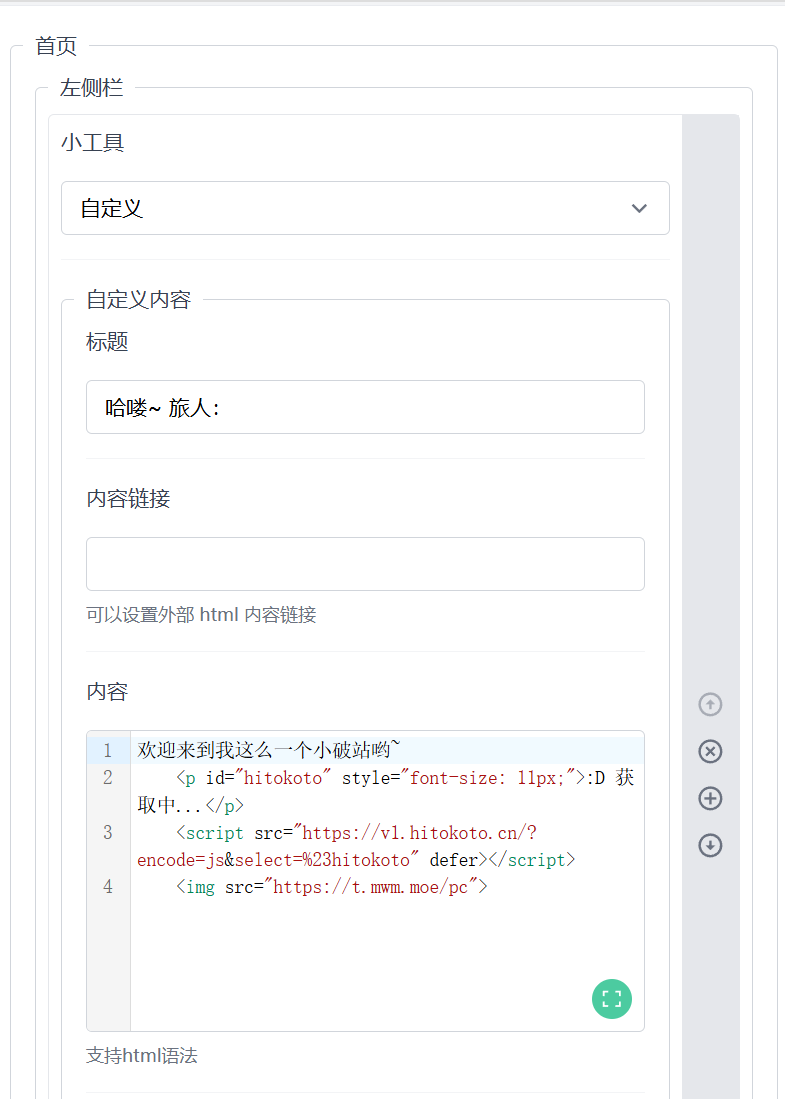
侧栏设置
banner(hexo)
hexo 主题提供了超级多的组件
效果图如下
![[博客美化记录-202411250018.png]]
{% banner 友情链接 请为一切不真实之物感到骄傲,因为我们高于这个世界! avatar:https://gcore.jsdelivr.net/gh/Keduoli03/My_img@img/img/%E5%A4%B4%E5%83%8F.jpg  bg:https://gcore.jsdelivr.net/gh/Keduoli03/My_img@img/img/pc2.webp %}
{% endbanner %}
一言 API
插入到合适地方即可
<p id="hitokoto" style="font-size: 11px;">:D 获取中...</p>
<script src="https://v1.hitokoto.cn/?encode=js&select=%23hitokoto" defer></script>
还有个 API 也可以选择
<script src="https://sdk.jinrishici.com/v2/browser/jinrishici.js" charset="utf-8"></script>随机图
插入到合适地方。
<img src="https://t.mwm.moe/pc">
# 备份 https://t.mwm.moe/pc | https://imgapi.xl0408.top/index.php
页脚

添加不蒜子统计
不蒜子是一个超级简单的网页计数器,可以用来统计站点信息。
引用方式也十分简单只要在对应位置添加以下代码即可
		<!--不蒜子计数器-->
        <script async src="https://busuanzi.sukap.cn/busuanzi.pure.mini.js"></script>
        <!--添加一个访问量-->
        <span style="text-align: center;">本"<span style=" color: hsl(192 98% 55%); font-weight: bold; ">页面</span>"访问 <span id="busuanzi_value_page_pv" style=" color: hsl(192 98% 55%); font-weight: bold; "></span> 次 | 👀总访问 <span id="busuanzi_value_site_pv" style=" color: hsl(192 98% 55%); font-weight: bold; "></span> 次 | 总访客 <span id="busuanzi_value_site_uv" style=" color: hsl(192 98% 55%); font-weight: bold; "></span> 人</span>
建站天数信息
在对应的页脚中插入以下代码即可实现。
        <span id="runtime_span" style="text-align: center;"></span>
        <script type="text/javascript">
          function show_runtime() {
          window.setTimeout("show_runtime()", 1000);
          X = new Date("2024/01/7 17:00:00");
          Y = new Date();
          T = (Y.getTime() - X.getTime());
          M = 24 * 60 * 60 * 1000;
          a = T / M;
          A = Math.floor(a);
          b = (a - A) * 24;
          B = Math.floor(b);
          c = (b - B) * 60;
          C = Math.floor((b - B) * 60);
          D = Math.floor((c - C) * 60);
          runtime_span.innerHTML = "⏱️本站已运行 " + A + "天" + B + "小时" + C + "分" + D + "秒"
          }
          show_runtime();
        </script>
Waline 评论
Waline 是一款简洁、安全的评论系统。优点:布置简单,功能强大。
官方地址: Waline官方
在引入前请自行部署服务端,部署也是很简单的,十分钟左右
引入
在合适的位置(如页脚)引入以下代码:
<link rel="stylesheet" href="https://unpkg.com/@waline/client@v3/dist/waline.css" />
<div id="waline"></div>
<script type="module">
  import { init } from 'https://unpkg.com/@waline/client@v3/dist/waline.js';

  const blockedPages = ['/categories', '/tags'];
  const currentPage = window.location.pathname;

  // 检查当前页面是否不在屏蔽列表中且不是首页
  const shouldShowWaline =!blockedPages.includes(currentPage) && currentPage!== '/';

  if (shouldShowWaline) {
    init({
      el: '#waline',
      serverURL: 'https://your serverURL',
      path: window.location.pathname,
    });
  }
</script>
我这个和官方有点不同,主要是 Halo 只能全局注入页脚,所以只能加个判断了,可自行修改
拓展 统计信息
Waline 还支持更多的操作,如添加表情包,添加访问信息,这里我就直接上源码了。
(顺便隐藏了一下统计信息)
<!--waline评论-->
<link rel="stylesheet" href="https://unpkg.com/@waline/client@v3/dist/waline.css" />
<div id="waline"></div>

<script type="module">
  import { init } from 'https://unpkg.com/@waline/client@v3/dist/waline.js';
  const blockedPages = ['/categories', '/tags'];
  const currentPage = window.location.pathname;

  // 合并判断条件,判断是否显示Waline相关内容(组件及统计信息)
  const shouldShowWalineRelated =!blockedPages.includes(currentPage) && currentPage!== '/';

  // 根据判断结果决定是否创建并插入统计信息
  if (shouldShowWalineRelated) {
    const statsInfoHTML = `
    <div id="waline-info" style="display: flex; justify-content: space-between; align-items: center;">
      <!--阅读量 -->
      <div style="display: flex; align-items: center;">
        阅读量: <span class="waline-pageview-count" data-path="/" style="margin-left: 5px;"></span>
      </div>
      <!--评论数 -->
      <div style="display: flex; align-items: center;">
        评论数:<span class="waline-comment-count" style="margin-left: 5px;"></span>
      </div>
    </div>
    `;
    const linkElement = document.querySelector('link[rel="stylesheet"][href="https://unpkg.com/@waline/client@v3/dist/waline.css"]');
    if (linkElement) {
      linkElement.insertAdjacentHTML('beforebegin', statsInfoHTML);
    }
    init({
      el: '#waline',
      serverURL: 'https://waline.blueke.top',
      path: window.location.pathname,
      pageview: true, // 浏览量统计
      comment: true, // 评论数统计
      emoji: [
        '//unpkg.com/@waline/emojis@1.2.0/alus',
        '//unpkg.com/@waline/emojis@1.2.0/qq',
      ],
    });
  }
</script>
还有一种,不过这个有点看网速,网速不好下面仍会出现,仅备份。
<!--waline-->
<!--统计信息-->
<div id="waline-info" style="display: flex; justify-content: space-between; align-items: center;">
  <!--阅读量 -->
  <div style="display: flex; align-items: center;">
    阅读量: <span class="waline-pageview-count" data-path="/" style="margin-left: 5px;"></span>
  </div>
  <!--评论数 -->
  <div style="display: flex; align-items: center;">
    评论数:<span class="waline-comment-count" style="margin-left: 5px;"></span>
  </div>
</div>

<!--waline评论-->
<link rel="stylesheet" href="https://unpkg.com/@waline/client@v3/dist/waline.css" />
<div id="waline"></div>

<script type="module">
  import { init } from 'https://unpkg.com/@waline/client@v3/dist/waline.js';
  const walineInfo = document.getElementById('waline-info');
  const blockedPages = ['/categories', '/tags'];
  const currentPage = window.location.pathname;

  // 合并判断条件,判断是否显示Waline相关内容(组件及统计信息)
  const shouldShowWalineRelated =!blockedPages.includes(currentPage) && currentPage!== '/';

  if (shouldShowWalineRelated) {
    init({
      el: '#waline',
      serverURL: 'https://waline.blueke.top',
      path: window.location.pathname,
      pageview: true, // 浏览量统计
      comment: true, // 评论数统计
      emoji: [
        '//unpkg.com/@waline/emojis@1.2.0/alus',
        '//unpkg.com/@waline/emojis@1.2.0/qq',
      ],
    });
  } else {
    // 如果不满足条件,直接移除统计信息元素
    walineInfo.parentNode.removeChild(walineInfo);
  }
</script>
再次备份,这个勉强可用,但是网速不好,下面会显示出来
<!--waline评论-->
<link rel="stylesheet" href="https://unpkg.com/@waline/client@v3/dist/waline.css" />
<div id="waline"></div>

<script type="module">
  import { init } from 'https://unpkg.com/@waline/client@v3/dist/waline.js';
  const blockedPages = ['/categories', '/tags'];
  const currentPage = window.location.pathname;

  // 合并判断条件,判断是否显示Waline相关内容(组件及统计信息)
  const shouldShowWalineRelated =!blockedPages.includes(currentPage) && currentPage!== '/';

  // 根据判断结果决定是否创建并插入统计信息的DOM结构
  if (shouldShowWalineRelated) {
    const statsInfoHTML = `
    <div id="waline-info" style="display: flex; justify-content: space-between; align-items: center;">
      <!--阅读量 -->
      <div style="display: flex; align-items: center;">
        阅读量: <span class="waline-pageview-count" data-path="/" style="margin-left: 5px;"></span>
      </div>
      <!--评论数 -->
      <div style="display: flex; align-items: center;">
        评论数:<span class="waline-comment-count" style="margin-left: 5px;"></span>
      </div>
    </div>
    `;
    document.body.insertAdjacentHTML('beforeend', statsInfoHTML);
    init({
      el: '#waline',
      serverURL: 'https://waline.blueke.top',
      path: window.location.pathname,
      pageview: true, // 浏览量统计
      comment: true, // 评论数统计
      emoji: [
        '//unpkg.com/@waline/emojis@1.2.0/alus',
        '//unpkg.com/@waline/emojis@1.2.0/qq',
      ],
    });
  }
</script>
第三方评论无法使用快速跳转底部的解决方案
建一个目录同级(或者直接右侧?)的功能,引入以下代码
<div>
  <button id="fixedButton" onclick="scrollButton()">回到底部</button>
</div>

<style>
  /* 这段CSS样式用于设置按钮的固定定位,使其不随页面滚动而移动,可根据需求调整样式 */
  #fixedButton {
    position: fixed;
    bottom: 300px; /* 距离页面底部20px,可按需调整此距离 */
    right: 333px; /* 距离页面右侧20px,可按需调整此距离 */
    padding: 5px 10px;
    background-color: #333;
    color: white;
    border: none;
    border-radius: 5px;
    cursor: pointer;
  }
</style>

<script>
function scrollButton() {
    // 设置每次点击向下滑动的固定距离,这里设置为200像素,你可按需修改此数值
    const scrollDistance = 20000;
    window.scrollBy(0, scrollDistance);
}
</script>
添加 artitalk 说说
Artitalk.js
现根据官方文档构建项目,然后在 halo 的页脚(内容页不知道为什么插不进去)插入下面代码即可。
<!-- 引用 artitalk -->
<script type="text/javascript" src="https://unpkg.com/artitalk"></script>
<!-- 存放说说的容器 -->
<div id="artitalk_main"></div>

<style>
  #artitalk_main .cbp_tmtimeline>li .cbp_tmlabel {
  font-size: 17px;
  font-weight: 600;
}
</style>
<script>
    window.onload = function () {
    const currentPath = window.location.pathname;
    const targetPages = ['/test', '/about'];

    if (targetPages.includes(currentPath)) {
        const artitalkScript = document.createElement('script');
        artitalkScript.type = "text/javascript";
        artitalkScript.src = "https://unpkg.com/artitalk";
        document.body.appendChild(artitalkScript);

        const artitalkContainer = document.createElement('div');
        artitalkContainer.id = "artitalk_main";
        document.body.appendChild(artitalkContainer);

        artitalkScript.onload = function () {
            new Artitalk({
                appId: '',
                appKey: '',
                color1: 'linear-gradient(45deg,rgba(109,208,242,0.75) 15%,rgba(245,154,190,0.75) 85%)',
	            color2: 'linear-gradient(45deg,rgba(109,208,242,0.75) 15%,rgba(245,154,190,0.75) 85%)',
                color3: 'black',
            });
        };
    }
};
</script>
Aplayer 组件封装
1. 创建 APlayer 组件插件
首先创建 src/plugins/rehype-component-aplayer. mjs 文件:
/// <reference types="mdast" />
import { h } from "hastscript";

/**
 * Creates an APlayer component.
 *
 * @param {Object} properties - The properties of the component.
 * @param {string} properties.title - The song title.
 * @param {string} properties.author - The song author/artist.
 * @param {string} properties.url - The audio file URL.
 * @param {string} properties.pic - The cover image URL.
 * @param {boolean} [properties.showlrc=false] - Whether to show lyrics.
 * @param {boolean} [properties.fixed=false] - Whether to use fixed mode.
 * @param {boolean} [properties.mini=false] - Whether to use mini mode.
 * @param {import('mdast').RootContent[]} children - The children elements of the component.
 * @returns {import('mdast').Parent} The created APlayer component.
 */
export function APlayerComponent(properties, children) {
	if (Array.isArray(children) && children.length !== 0)
		return h("div", { class: "hidden" }, [
			'Invalid directive. ("aplayer" directive must be leaf type "::aplayer{title="..." author="..." url="..." pic="..."}")',
		]);

	if (!properties.title || !properties.author || !properties.url)
		return h(
			"div",
			{ class: "hidden" },
			'Invalid APlayer configuration. ("title", "author", and "url" attributes are required)',
		);

	const playerUuid = `AP${Math.random().toString(36).slice(-6)}`; // Collisions are not important

	// 创建播放器容器
	const nPlayerContainer = h(`div#${playerUuid}-player`, {
		class: "aplayer-container"
	});

	// 创建初始化脚本
	const nScript = h(
		`script#${playerUuid}-script`,
		{ type: "text/javascript", defer: true },
		`
		// 确保 APlayer CSS 已加载
		if (!document.querySelector('link[href*="aplayer"]')) {
			const link = document.createElement('link');
			link.rel = 'stylesheet';
			link.href = 'https://cdn.jsdelivr.net/npm/aplayer/dist/APlayer.min.css';
			document.head.appendChild(link);
		}

		// 确保 APlayer JS 已加载
		if (typeof APlayer === 'undefined') {
			const script = document.createElement('script');
			script.src = 'https://cdn.jsdelivr.net/npm/aplayer/dist/APlayer.min.js';
			script.onload = function() {
				initPlayer_${playerUuid}();
			};
			document.head.appendChild(script);
		} else {
			initPlayer_${playerUuid}();
		}

		function initPlayer_${playerUuid}() {
			const container = document.getElementById('${playerUuid}-player');
			if (container && typeof APlayer !== 'undefined') {
				const player = new APlayer({
					container: container,
					showlrc: ${properties.showlrc || false},
					fixed: ${properties.fixed || false},
					mini: ${properties.mini || false},
					audio: [{
						title: '${properties.title.replace(/'/g, "\\'").replace(/"/g, '\\"')}',
						artist: '${properties.author.replace(/'/g, "\\'").replace(/"/g, '\\"')}',
						url: '${properties.url}',
						pic: '${properties.pic || ''}'
					}]
				});
				console.log("[APLAYER] Loaded player for ${properties.title} | ${playerUuid}.");
			}
		}
		`,
	);

	return h(
		`div#${playerUuid}-wrapper`,
		{
			class: "aplayer-wrapper",
			"data-title": properties.title,
			"data-author": properties.author,
		},
		[nPlayerContainer, nScript],
	);
}
2. 添加样式
在 src/styles/markdown-extend. styl 文件中添加 APlayer 样式:
// ... existing code ...

// APlayer 组件样式
.aplayer-wrapper
  display: block
  margin: 1rem 0
  border-radius: var(--radius-large)
  overflow: hidden
  background: var(--card-bg)
  border: 1px solid var(--line-divider)

  .aplayer-container
    min-height: 66px

  // 自定义 APlayer 主题以匹配网站样式
  .aplayer
    background: var(--card-bg)
    color: var(--tw-prose-body)
    box-shadow: none
    border-radius: 0
    margin: 0

    .aplayer-info
      background: var(--card-bg)

    .aplayer-music
      .aplayer-title
        color: var(--tw-prose-headings)

      .aplayer-author
        color: var(--tw-prose-body)

    .aplayer-controller
      .aplayer-bar-wrap
        .aplayer-bar
          background: var(--btn-regular-bg)

          .aplayer-loaded
            background: var(--btn-regular-bg-hover)

          .aplayer-played
            background: var(--primary)

            .aplayer-thumb
              background: var(--primary)

      .aplayer-time
        color: var(--tw-prose-body)

    .aplayer-list
      background: var(--card-bg)
      border-top: 1px solid var(--line-divider)

      li
        background: var(--card-bg)
        color: var(--tw-prose-body)
        border-bottom: 1px solid var(--line-divider)

        &:hover
          background: var(--btn-regular-bg-hover)

        &.aplayer-list-light
          background: var(--btn-regular-bg-active)
3. 在 Astro 配置中注册组件
修改 astro.config.mjs 文件,添加 APlayer 组件:
// ... existing imports ...
import { APlayerComponent } from "./src/plugins/rehype-component-aplayer.mjs";

// ... existing code ...

markdown: {
    remarkPlugins: [
        // ... existing plugins ...
    ],
    rehypePlugins: [
        // ... existing plugins ...
        [
            rehypeComponents,
            {
                components: {
                    github: GithubCardComponent,
                    aplayer: APlayerComponent,  // 添加这一行
                    note: (x, y) => AdmonitionComponent(x, y, "note"),
                    // ... existing components ...
                },
            },
        ],
        // ... existing plugins ...
    ],
},
4. 使用方法
现在你可以在 Markdown 文件中使用 APlayer 指令:
::aplayer{title="半岛铁盒" author="周杰伦"
url="https://echeverra.cn/wp-content/
uploads/2022/05/周杰伦-半岛铁盒.mp3"
pic="https://echeverra.cn/wp-content/
uploads/2022/05/周杰伦-半岛铁盒-mp3-image.
png"}

// 或者使用其他选项
::aplayer{title="歌曲名" author="歌手"
url="音频链接" pic="封面链接"
showlrc="true" mini="true"}
5. 支持的参数
- title (必需): 歌曲标题
- author (必需): 歌手/艺术家
- url (必需): 音频文件链接
- pic (可选): 封面图片链接
- showlrc (可选): 是否显示歌词,默认 false
- fixed (可选): 是否固定模式,默认 false
- mini (可选): 是否迷你模式,默认 false